

Appearance
Postbacks and Macros
The macros Linkrunner fills into your postback URLs, with examples for each conversion
Overview
When a conversion is attributed to your click, Linkrunner sends a server-to-server postback to your endpoint. You give Linkrunner a postback URL that contains macros. Linkrunner replaces each macro with the real value and sends the request.
You provide one URL template per conversion you want to receive (install, signup, in-app event). Linkrunner sends the request as an HTTP GET.
Event mapping
Linkrunner sends these postbacks automatically:
- Install, for every install attributed to your click.
- Signup, once a signup postback is set up for you.
In-app events (for example a purchase) are sent only after they are mapped. Events without a mapping are not sent to you.
Either side can add a mapping:
- The advertiser, from Integrations → your network → Event Mapping in their Linkrunner dashboard.
- You, from Event Mapping in your affiliate dashboard.
Each mapping picks one of the advertiser's events and the name it is sent to you as, for example purchase sent as sale. It can also turn on Send Revenue so the postback includes the event's revenue and currency.
See Event Mapping for a walkthrough of the screen, including how to apply a mapping to all your customers or only one.
Missing an event you expected? Check that it has a mapping for this advertiser.
Allowlist Linkrunner postback IPs
If your endpoint restricts incoming traffic by source IP, allowlist both Linkrunner production egress addresses:
8.234.94.188/32
8.234.80.204/32
Postbacks may originate from either address. Add both before testing or activating your integration.
These are postback URL macros. They are different from the macros your platform may use in the click tracking link. Your platform must resolve click macros before sending traffic to Linkrunner.
Rejected conversions
A customer can run Fraud Control rules that reject conversions attributed to you. To be told about them, add rejection postback URLs in your affiliate dashboard under Settings → Postback URLs → Rejection postbacks.
| URL | Called for |
|---|---|
| Install Rejection URL | A rejected install |
| Event Rejection URL | A rejected in-app event, signup, or revenue event |
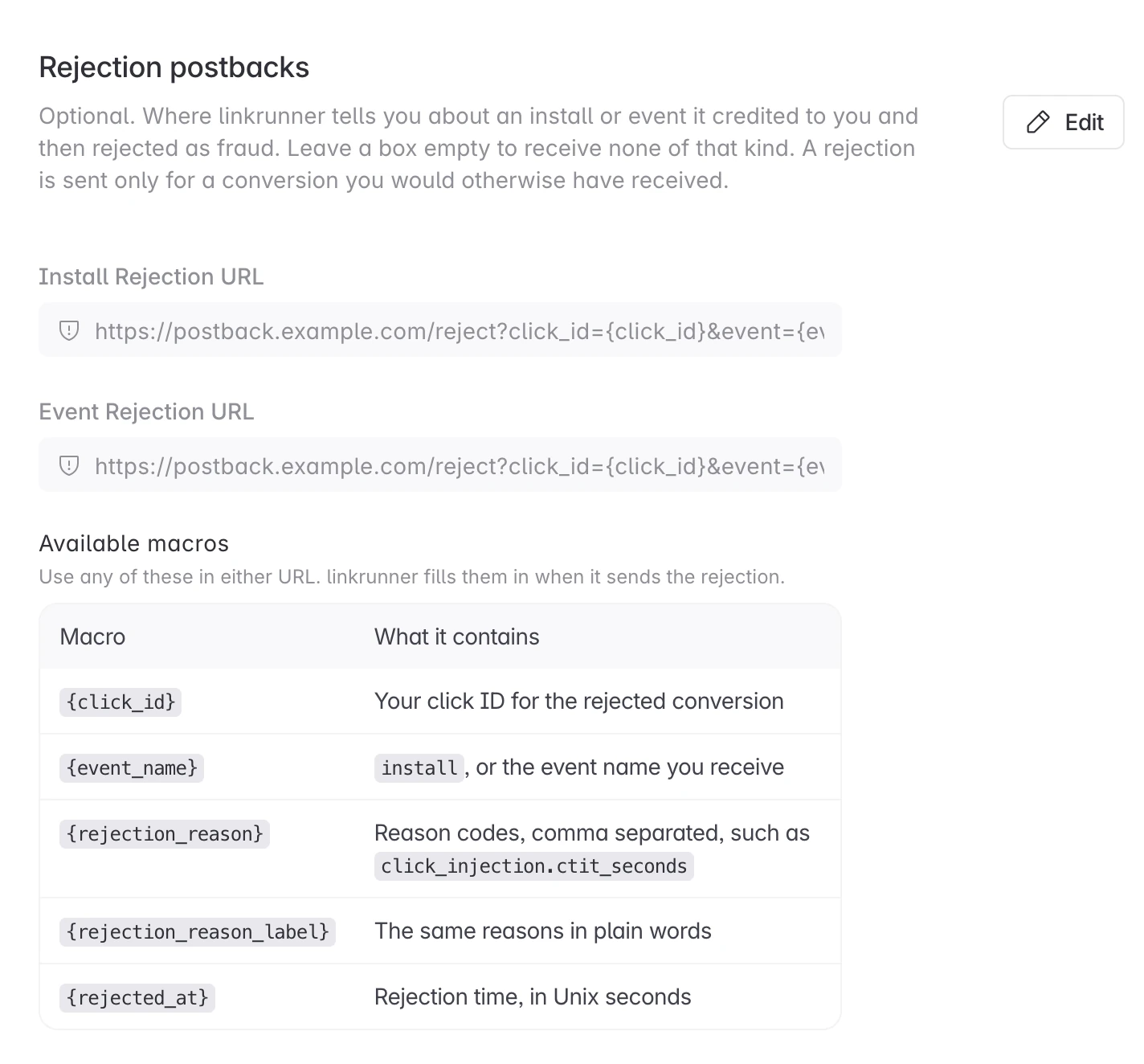
Both are optional. Leave one empty and you receive none of that kind. You can add them once your application is approved.
A rejection is sent only for a conversion you would otherwise have received, so your event mappings still apply. It is sent once and never retried, whatever your endpoint answers. Treat it as a conversion you must not pay out on. Your usual postback URL is not called for a rejected conversion.
Rejection macros
A rejection URL can use the macros above, plus three that exist only in a rejection URL:
| Macro | Value |
|---|---|
{click_id} | Your click ID for the rejected conversion |
{event_name} | install, or the name you receive the event under |
{rejection_reason} | Reason codes, comma separated, for example click_injection.ctit_seconds |
{rejection_reason_label} | The same reasons in plain words, separated by ; |
{rejected_at} | When Linkrunner rejected the conversion, in Unix seconds |
For example, this rejection URL:
https://postback.example.com/reject?click_id={click_id}&event={event_name}&reason={rejection_reason}&at={rejected_at}is sent as:
https://postback.example.com/reject?click_id=a1b2c3d4e5&event=install&reason=device_farm.manufacturer%2Cclick_injection.ctit_seconds&at=1790353906Reason codes
Each code is <rule type>.<property>: the kind of rule that matched, and the property it matched on. A code can be a rule type alone when the rule did not match on a single property. A conversion can carry several codes, and each code appears once.
A rule type that is not in this list is sent as custom_rule, for example custom_rule.device_model. New codes can be added, and existing codes do not change meaning, so treat a code you do not recognise as a rejection.
| Rule type | Meaning |
|---|---|
click_injection | Click injection |
click_flooding | Click flooding |
click_flooding_ip | Click flooding from one IP |
click_flooding_device | Click flooding from one device |
install_hijacking | Install hijacking |
sdk_spoofing | SDK spoofing |
sdk_spoofing_ip_mismatch | SDK spoofing with IP mismatch |
flagged_click_install | Install from a fraudulent click |
flagged_click_reinstall | Reinstall from a fraudulent click |
anonymous_traffic | Anonymous traffic |
datacenter_ip | Anonymous traffic from a data center IP |
datacenter_reinstall | Anonymous traffic reinstall |
datacenter_ip_mismatch | Anonymous traffic with IP mismatch |
bots | Bots |
bots_user_agent | Bots by user agent |
device_farm | Device farm |
custom_rule | Custom rule |
| Property | Meaning |
|---|---|
os_version | OS version |
app_version | App version |
package_version | SDK version |
platform | Platform |
country | Country |
locale | Locale |
carrier | Carrier |
manufacturer | Manufacturer |
device_model | Device model |
att_status | ATT status |
limit_ad_tracking | Limit ad tracking |
gaid | Google advertising ID |
idfa | IDFA |
ip_address | Server-observed IP |
device_ip | SDK-reported device IP |
device_ip_matches_server_ip | Device IP matches server IP |
attribution_source | Attribution source |
ad_network_id | Ad network |
campaign_id | Campaign |
is_reinstall | Is reinstall |
signature_verification_status | SDK signature status |
ctit_seconds | Click-to-install time (s) |
install_ref_referrer_click_ts | Play referrer click timestamp |
install_ref_install_begin_ts | Play install-begin timestamp |
click_after_install_begin | Click recorded after install began |
first_open_at | First open timestamp |
matched_click_is_fraud | Matched a flagged click |
matched_click_fraud_reasons | Flagged click reasons |
event_name | Event name |
event_type | Event type |
amount | Revenue amount |
currency | Currency |
revenue_type | Revenue type |
revenue_status | Revenue status |
days_since_click | Days since click |
user_agent | User agent |
os | OS |
device_type | Device type |
device_vendor | Device vendor |
browser_name | Browser |
referrer_domain | Referrer domain |
device_id | Device ID (GAID or IDFA) |
link | Click URL |
is_unique | Is unique click |
Click tracking link
The Linkrunner dashboard shows a click tracking link for your campaign. For affiliate campaigns, the click link uses Linkrunner's click parameters:
https://track.example.com/?c=OgWmhiSXhG&tid={click_id}&s2={campaign_id}&s3={publisher_id}&gaid={gaid}Your platform resolves the placeholders before redirecting the user to Linkrunner. The actual click should look like this:
https://track.example.com/?c=OgWmhiSXhG&tid=a1b2c3d4e5&s2=camp_88&s3=pub_4471&gaid=38400000-8cf0-11bd-b23e-10b96e40000d| Parameter | Use |
|---|---|
c | Linkrunner campaign identifier. Keep the value from the dashboard. |
tid | Your click ID. Linkrunner returns this in postbacks as {click_id} and {tid}. |
s2, s3, s4 | Optional passthrough values. Linkrunner returns them in postbacks as {s2}, {s3}, and {s4}. |
gaid | Android Google Advertising ID, when available. |
idfa | iOS advertising ID, when available. |
Use these parameter names in the URL. For example, use tid={click_id} instead of utm_id={click_id}, and use s2={campaign_id} instead of cc={campaign_id}.
Do not add postback-only values such as postbackKey, event, event_name, or crc to the click tracking link. If your postback endpoint requires a secret key, configure it privately with Linkrunner.
Macro syntax
Macros are written in lowercase inside curly braces:
{macro_name}Rules:
- Linkrunner replaces every macro it recognizes with the conversion's value.
- Values are URL-encoded automatically. Do not encode the macros yourself.
- A macro with no value for a given conversion is replaced with an empty string. For example,
{idfa}is empty on an Android install. - Text that is not a recognized macro is left untouched, so static query parameters are safe.
- All timestamps are Unix seconds in UTC.
Any macro on this page can arrive empty when the value is not known for that conversion. Build your endpoint to accept empty values rather than reject the request.
Only use the postback macros listed below in your postback URL template. Linkrunner leaves unsupported campaign, event, platform, sub, and secret placeholders unchanged.
Macro reference
Identifiers
| Macro | Description |
|---|---|
{click_id} | The tid value you sent on the tracking link. Use this to match the postback to your click. |
{tid} | Same value as {click_id}. |
{install_id} | Linkrunner's unique identifier for the install. |
{campaign_id} | Your campaign ID from the click link when you sent one. Otherwise Linkrunner's numeric campaign ID (for example 4471). |
{cc} | Same value as {campaign_id}. |
Event
| Macro | Description |
|---|---|
{event_name} | The conversion name: install, signup, or the mapped in-app event name (for example purchase, or your goal name if the mapping renames it). |
{event} | Same value as {event_name}. |
{timestamp} | Time when Linkrunner builds the postback, as a Unix timestamp in seconds. |
{timestamp} is when the postback was sent, not when the conversion happened. Use {event_time} for the time of the event itself.
Time
All three are Unix timestamps in seconds, UTC.
| Macro | Description | Example |
|---|---|---|
{click_time} | Time of the click that the conversion was attributed to. | 1789653202 |
{install_time} | Time of the install, measured as the first app open received by Linkrunner's servers. | 1789653349 |
{event_time} | Time the event happened. On an install postback this is the same value as {install_time}. | 1789667620 |
{install_time} is the first app open as received by Linkrunner's servers, the same definition other MMPs use. It is not the Play Store download or install-begin time.
App
| Macro | Description | Example |
|---|---|---|
{bundle_id} | App bundle ID (iOS) or package name (Android). | com.example.app |
{app_version} | Version of the app the user is running. | 15.2.209 |
Revenue
| Macro | Description |
|---|---|
{revenue} | Revenue amount in major currency units, with two decimal places (for example 9.99). Populated only on events that carry revenue and whose mapping has Send Revenue on. |
{sale_amount} | Same value as {revenue}. |
{amount} | Same value as {revenue}. |
{currency} | ISO 4217 currency code (for example USD, INR). |
{revenue} is in major currency units, not minor units. 9.99 means 9.99, not 9.99 cents. Parse it as a decimal amount.
Device
| Macro | Description | Example |
|---|---|---|
{gaid} | Google Advertising ID (Android). | 38400000-8cf0-11bd-b23e-10b96e40000d |
{idfa} | iOS Advertising ID (Apple). | 6D92078A-8246-4BA4-AE5B-76104861E7DC |
{device_brand} | Device brand. | POCO |
{device_model} | Device model. Android sends a readable name, iOS sends the hardware identifier. | Xiaomi 2302EPCC4I (Android), iPhone15,2 (iOS) |
{os_version} | Operating system version. | 13 |
{platform} | android or ios, always lowercase. | android |
Network
| Macro | Description | Example |
|---|---|---|
{ip} | The device's public IP address at install. | 203.0.113.24 |
{user_agent} | The user agent of the matched click, not of the app's install request. | Mozilla/5.0 (Linux; Android 10; K) AppleWebKit/537.36 (KHTML, like Gecko) Chrome/151.0.0.0 Mobile Safari/537.36 |
{user_agent} and {click_time} come from the click the conversion was matched to. {ip} is the device's public IP at install time.
Attribution
| Macro | Description | Example |
|---|---|---|
{is_reinstall} | 1 if the user had installed the app before, 0 if this is a first install. | 0 |
{touch_type} | The type of touch the conversion was attributed to: click, or impression for a view-through install. | click |
{touch_type} is impression only when the install was credited to an impression you reported through S2S impressions.
Click passthrough
| Macro | Description |
|---|---|
{s2} | The s2 value you sent on the tracking link. |
{s3} | The s3 value you sent on the tracking link. |
{s4} | The s4 value you sent on the tracking link. |
Static values
If your endpoint needs a fixed query parameter, add it as plain text in the URL template:
https://partner.example.com/postback?tid={click_id}&source=linkrunnerDo not use {secret.postbackKey}. If your endpoint requires a secret key, configure it privately with Linkrunner so it is not shown in dashboard tracking links or public examples.
Not available
- Country code. There is no country macro. Derive it from
{ip}if you need one. - App store ID. Use
{bundle_id}. On Android it is the same value as the Play Store listing ID. - Retargeting and re-engagement conversions. Linkrunner does not send affiliate postbacks for these.
Examples
Install postback
Your template:
https://partner.example.com/postback?tid={click_id}&event={event_name}&gaid={gaid}&s2={s2}&click_time={click_time}&install_time={install_time}&bundle_id={bundle_id}&platform={platform}What Linkrunner sends:
https://partner.example.com/postback?tid=a1b2c3d4e5&event=install&gaid=38400000-8cf0-11bd-b23e-10b96e40000d&s2=camp_88&click_time=1789653202&install_time=1789653349&bundle_id=com.example.app&platform=androidSignup postback
https://partner.example.com/postback?tid={click_id}&event={event_name}&s2={s2}&event_time={event_time}Purchase postback with revenue
Your template:
https://partner.example.com/postback?tid={click_id}&event={event_name}&amount={revenue}¤cy={currency}&event_time={event_time}&ts={timestamp}What Linkrunner sends:
https://partner.example.com/postback?tid=a1b2c3d4e5&event=purchase&amount=9.99¤cy=USD&event_time=1789667620&ts=1789667623Device and attribution detail
Your template:
https://partner.example.com/postback?tid={click_id}&event={event_name}&brand={device_brand}&model={device_model}&os={os_version}&app_version={app_version}&ip={ip}&reinstall={is_reinstall}&touch={touch_type}What Linkrunner sends:
https://partner.example.com/postback?tid=a1b2c3d4e5&event=install&brand=POCO&model=Xiaomi+2302EPCC4I&os=13&app_version=15.2.209&ip=203.0.113.24&reinstall=0&touch=clickDeduplication
Linkrunner retries a postback if your endpoint does not respond with a success status. Treat postbacks as at-least-once. Deduplicate on your click ID plus event name, or use a fixed value you send in s4 on the click link.
Formatting reference
| Value | Format |
|---|---|
Timestamps ({timestamp}, {click_time}, {install_time}, {event_time}) | Unix seconds, UTC. |
Revenue ({revenue}) | Decimal, two places, major currency units. |
Currency ({currency}) | ISO 4217 three-letter code. |
Platform ({platform}) | Lowercase android or ios. |
Reinstall flag ({is_reinstall}) | 1 or 0. |
| All values | URL-encoded. |
Troubleshooting
A macro arrives empty. The value was not available for that conversion. For example, {idfa} is empty on Android, and {revenue} is 0 on events without revenue. Device advertising IDs depend on the value being present on the click and on user consent.
A macro arrives as literal text. That macro is not supported by the current Linkrunner postback renderer. Use one of the macros listed on this page.
You do not receive an in-app event. In-app events are sent only after they are mapped. Ask the advertiser to map the event, or add the mapping yourself from Event Mapping in your affiliate dashboard. See Event mapping.
You want to check whether a postback reached you. Open Postback Logs in your affiliate dashboard. It shows every conversion sent to you and what your endpoint answered.
You receive the same conversion twice. Postbacks are at-least-once. Deduplicate on your click ID plus event name, or use a fixed value you send in s4 on the click link.
Revenue looks 100x too large or too small.{revenue} is in major units (9.99), not minor units. Do not multiply or divide by 100.
Need help? Contact support@linkrunner.io